30 seconds version
Summary
PROBLEM
Existing workflow was difficult to scale.
customers needed flexible configurations.
Manual setup made assessment creation time-consuming.
Hard-coded logic inc engineering effort for new requirements.

Solution

Restructured the flow into a 4-step assessment engine.
Introduced hierarchical scoring with sections and subsections.
Reduced manual work with Excel import, reusable certificates, and bulk actions.
IMPACT
48% faster assessment creation.
3× more enterprise use cases supported.
56% less repetitive admin work.
35% less engineering effort for customization.

Understanding the Product
Context
Who is BetterPlace?
Asia’s leading human capital SaaS platform, empowering enterprises to manage the complete lifecycle of their frontline workforce. As an HRMS solution, BetterPlace addresses every aspect of frontline workforce management, including discovery, hiring, onboarding, background verification, payroll, upskilling, and workforce services.
“Upskill” is one of the products in our HRMS solution that helps companies manage learning and development for their frontline workers.
Hire
Onboard
Verify
Upskill
Payroll
Attend
Benefits
Vendors
Betterplace hrms pRODUCTS
UPSKILL TOOL
lOGS
MANAGE Sites
reports
Approval
Assessment is a tool that helps admins test worker knowledge, evaluate performance, and measure how effectively training has been understood.
Assessment
Problem
As enterprise assessment requirements grew, the existing experience started showing its limits. Admins were finding it harder to create and configure complex assessments, while the product had limited flexibility to support different evaluation and result needs.
Why did we start this?
Why now?
Growing enterprise needs
Customers were asking for more flexible assessment, scoring, evaluation, and result configurations.
The existing system was reaching its limits
What worked for simpler assessments became increasingly difficult to manage as assessments became larger and more complex.
The cost of staying rigid was growing
New requirements increasingly meant workarounds, manual effort, or engineering intervention- making the experience harder to scale.
1
2
3
Users & Research

USER INTERVIEWS
What admins told us:
“ For larger assessments, it gets difficult to keep track ”
“ I need different scoring for different questions ”
“ I already prepare my questions in Excel ”
“ I want more control over what the learner sees ”
“ For large assessments, doing this question by question is tedious ”
SELF EVALUATION
What I observed:
Conducted a self-evaluation of our design using heuristic principles and our design intuition. This helped us identify key areas for improvement and ensure the design aligned with user needs.
(Finding will discussed along with the solution in the solution section)
What I heard + what I observed
Frustration & Findings
Before redesigning the workflow, I wanted to understand where the existing experience was breaking down in real assessment-building scenarios.

No way to add a new question without leaving the assessment
Admins had to leave the assessment flow to create a new question, breaking their momentum and making creation unnecessarily fragmented.
One hidden switch replaces every setting & adds a step to the flow
Important settings were tucked behind a single Basic/Advanced toggle, making them harder to discover and adding an unexpected step when differential scoring was enabled.


Scoring was difficult to configure at scale
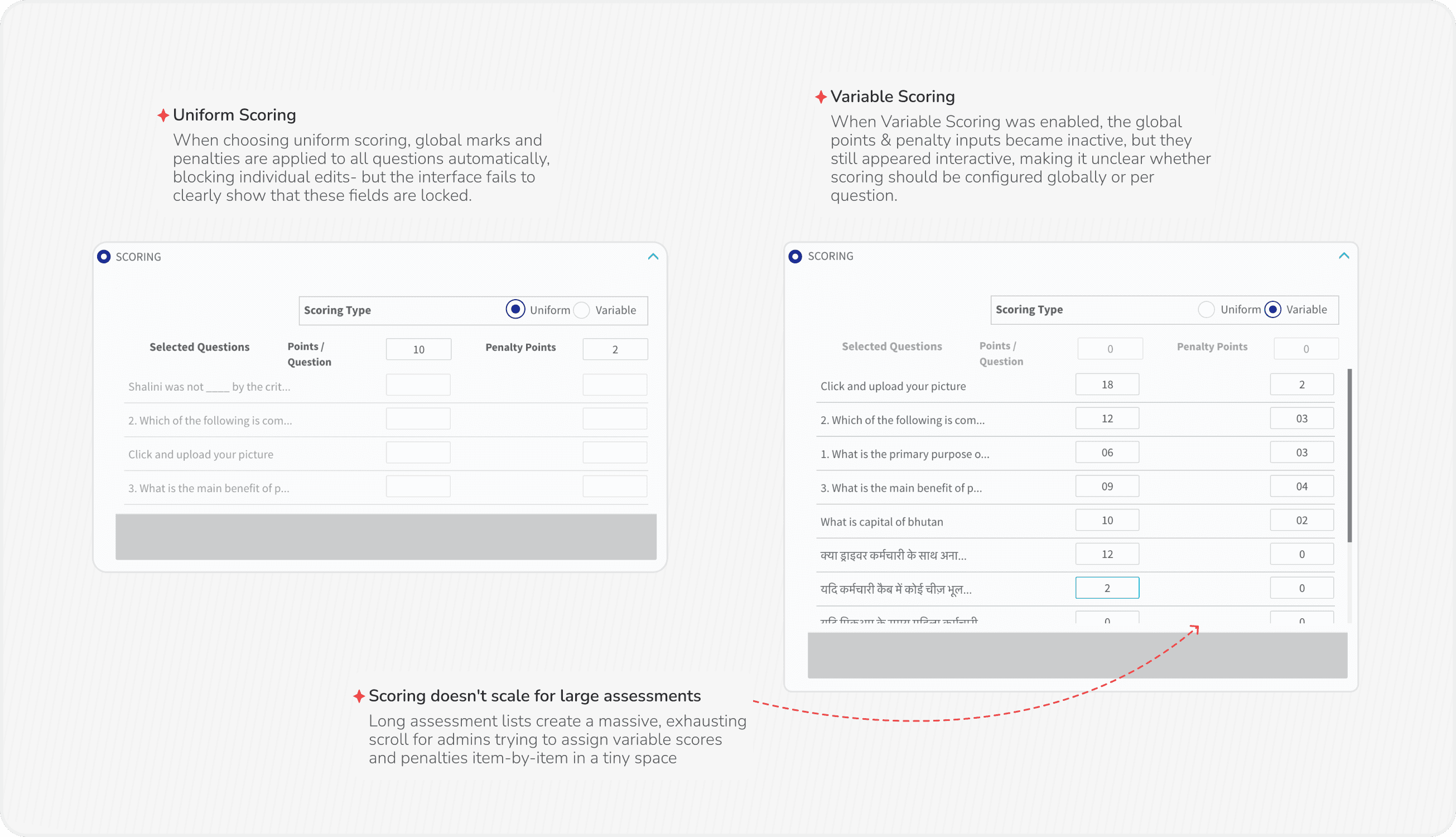
Then came the marks. Uniform locked every question to the same value. Variable unlocked them but gave no way to set a group at once - 63 questions meant 63 rows, entered by hand.
Results offered little beyond a score
Learners primarily received a score or pass/fail outcome, while admins had limited control over how results, feedback, and next steps could be presented.

So what was the real problem?
Problem Reframing
For Business
How might we build a scalable assessment engine that reduces engineering dependency and supports diverse enterprise requirements - without building a custom solution every time & and strengthens customer retention?
For Users
How might we help admins create assessments faster and with less manual effort, while giving them the flexibility to configure evaluations for different business needs?
“ We needed to make assessments more flexible for the business, without making them more complex for admins. ”
How & What did we choose to solve?
Design Direction
To eliminate cognitive overload and streamline the setup process, I redesigned assessment creation from a single, tedious workflow into a progressive, 4-step flow.
BEFORE
Questions, scoring, passing marks and all other settings are competing on one page
AFTER
Linear flow with clear ownership.
Change one stage without disturbing the rest
1
Basic Details
2
Creation
3
Evaluation
4
Result
Built for Speed
Built to be configured
Flexible enough to support how different organizations evaluate & communicate results
Built for faster assessment creation with minimal setup and reduced manual effort.

From a rigid workflow to a configurable assessment engine
Design Direction
STAGE 1
Basic Details
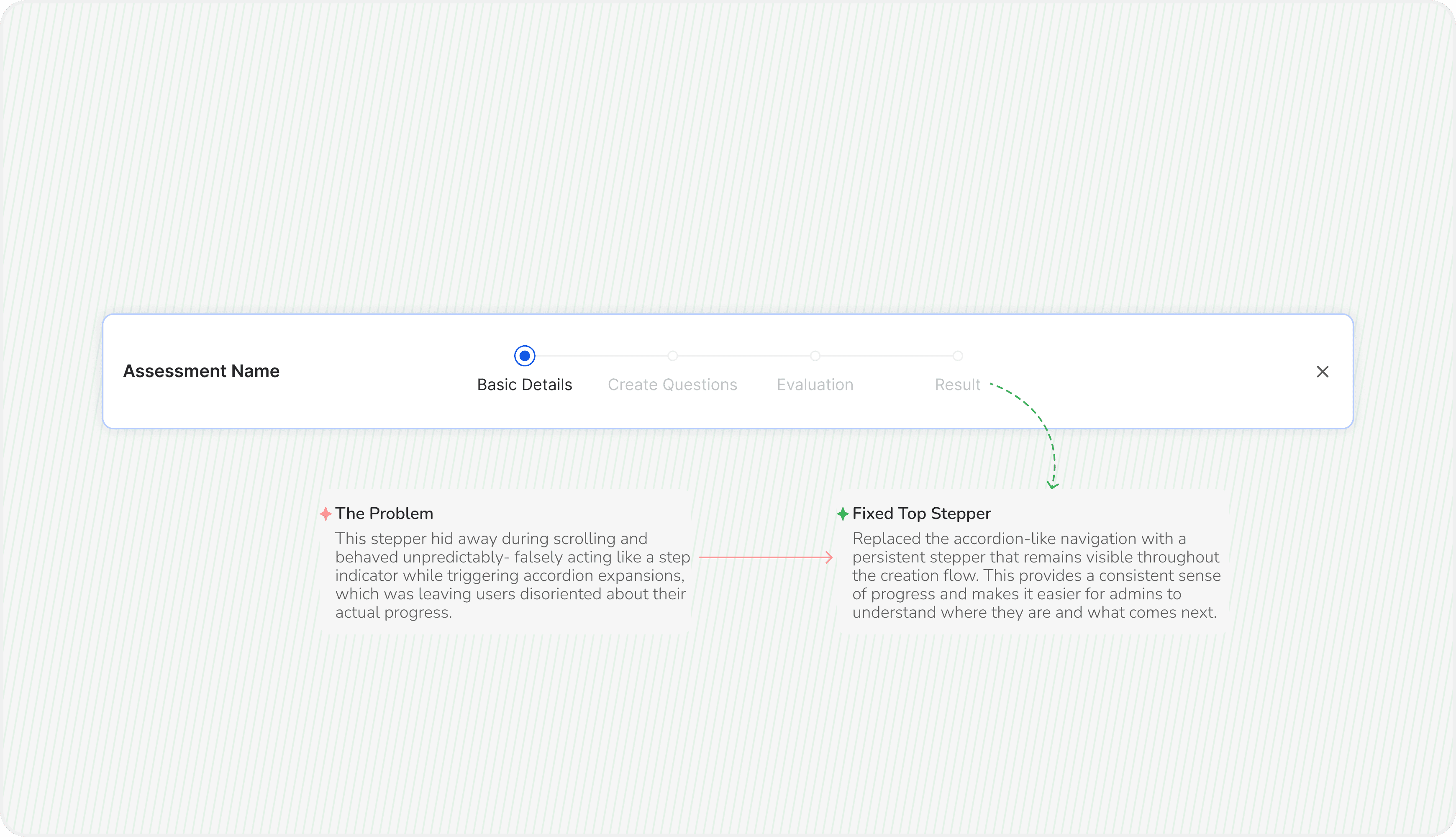
This stage is the foundation of assessment creation. It captures the essential information required before admins can move on to creating questions, configuring evaluation, and defining results.
OLD SCREENS
Setting up an assessment felt rigid and difficult to configure


Redesigned SCREENS
A clearer, more flexible foundation for assessment setup

STAGE 2
Create Question
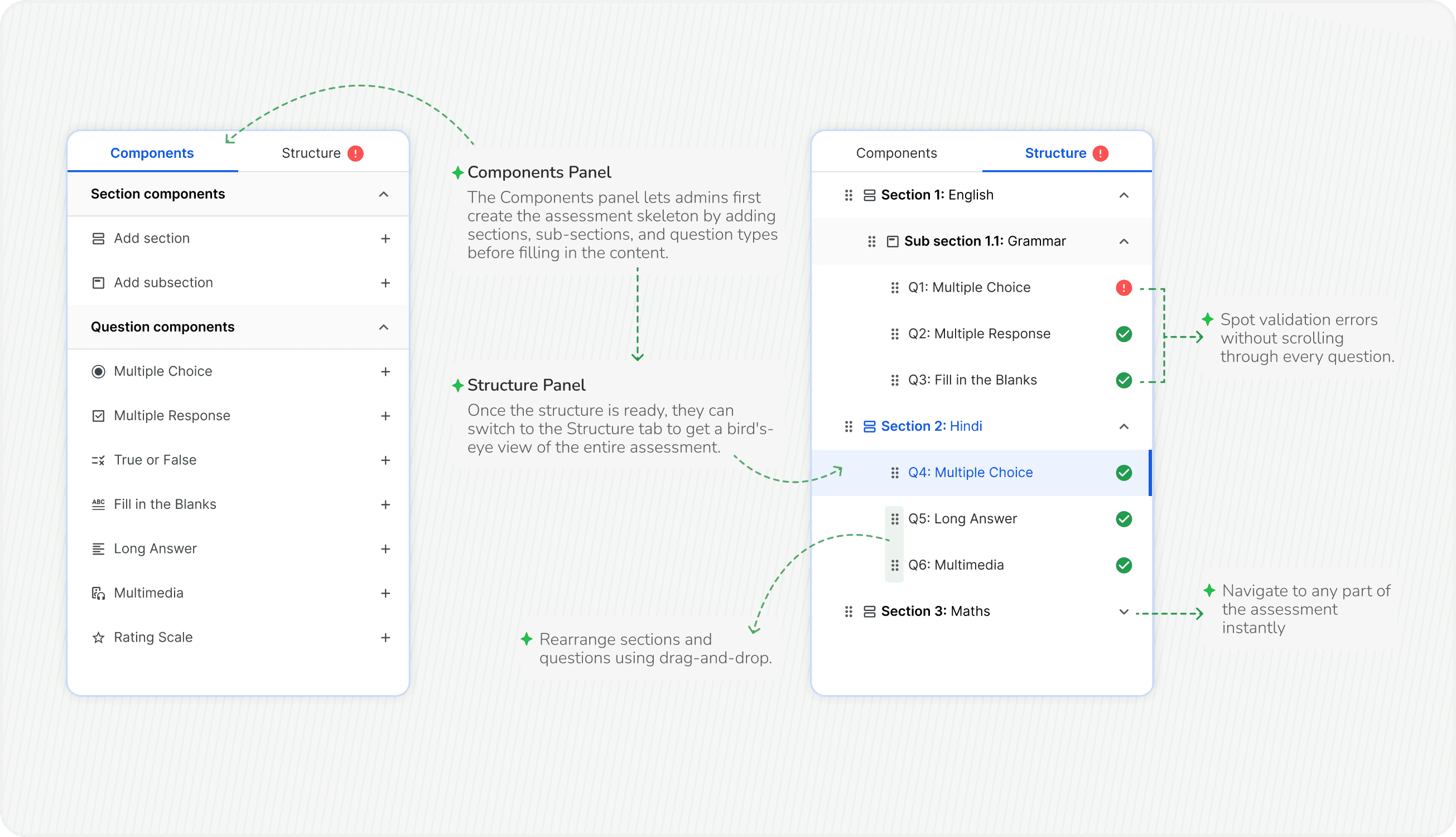
With the assessment details in place, admins build the assessment itself - defining the content, organising questions, and preparing everything for evaluation.
Because it is the longest and most interactive part of the workflow, even small usability issues compound quickly into a slower and more frustrating creation process.
FINDINGS FROM INTERVIEWS
Three problems the interface never showed
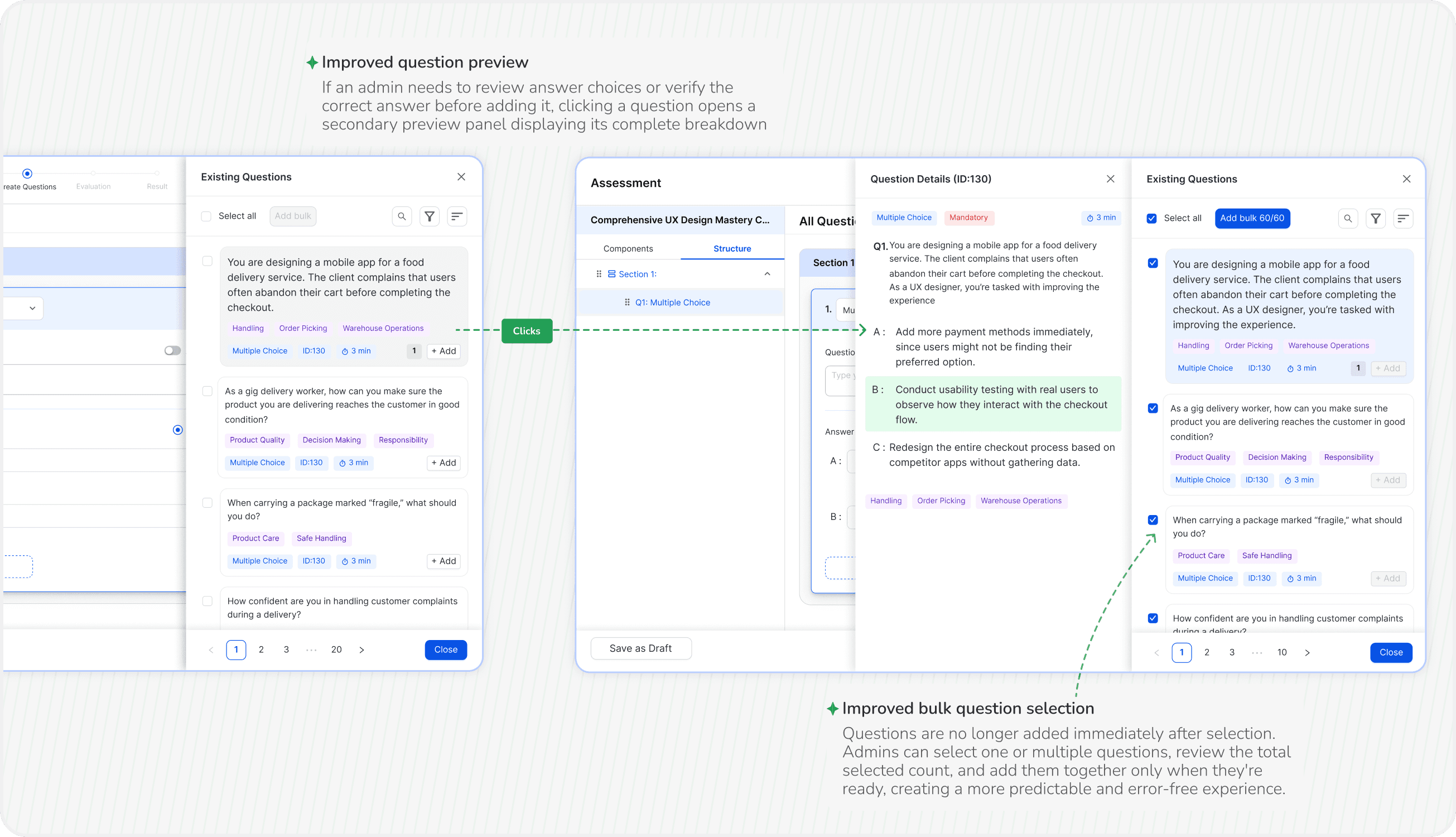
Admins preparing large assessments already worked in Excel, but questions had to be created in a separate module first, then added manually.
As assessments expanded across multiple skills and topics, there was no way to organise related questions inside a single workflow.
Without a structured way to group questions, reviewing, navigating and maintaining a large assessment became slow and error-prone.
OLD SCREENS
Creating and organizing questions disrupted the assessment-building flow


Redesigned SCREENS
A smoother workflow to build and structure assessments



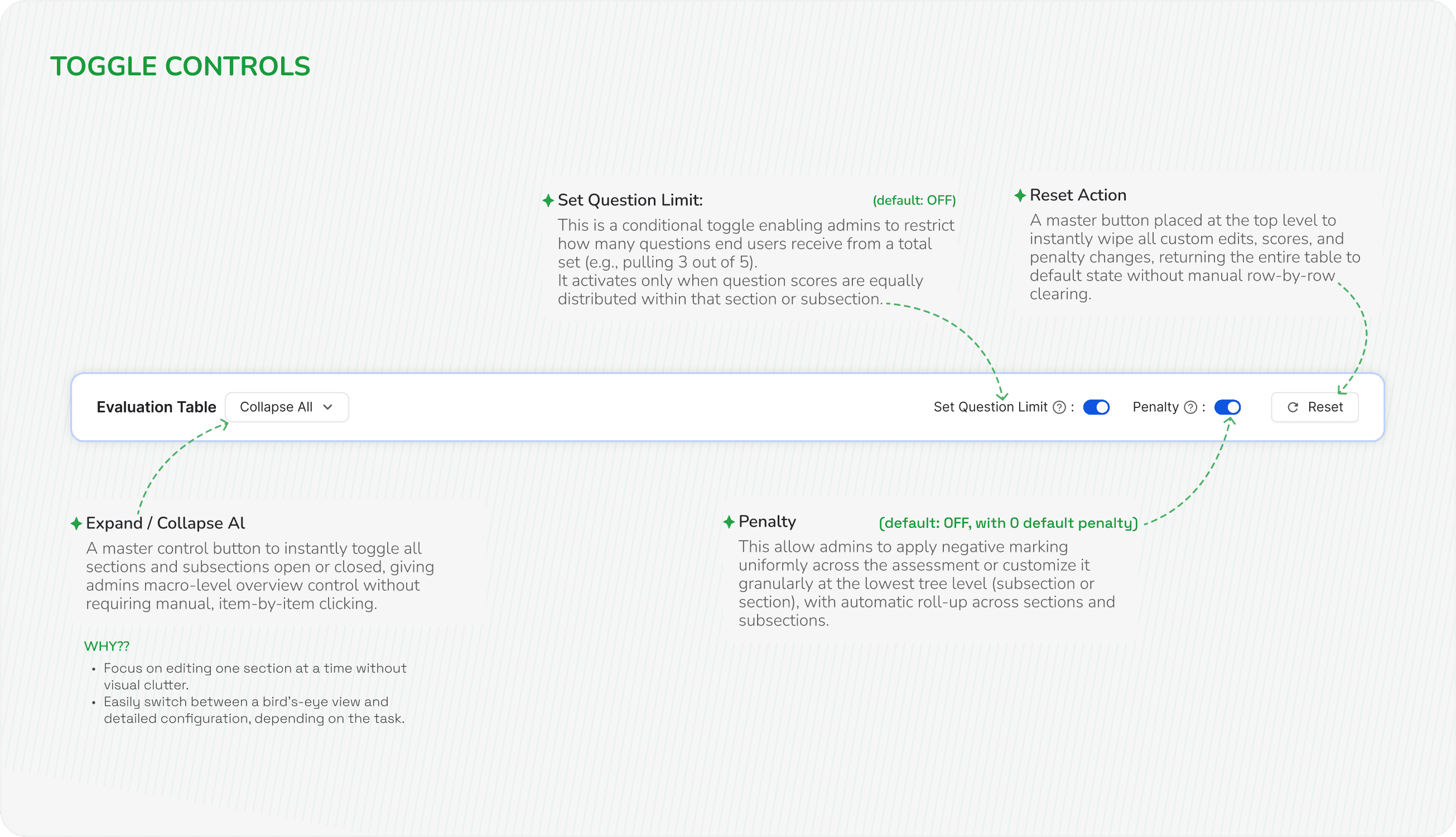
STAGE 3
Evaluation
Creating questions is only half the journey. An assessment becomes meaningful only when organizations can define how those questions should be scored and evaluated.
Whether it’s a simple knowledge test or a role-specific evaluation with different weightage, this stage lays the foundation for meaningful performance measurement.
FINDINGS FROM INTERVIEWS
Three problems the interface never showed
Question titles were truncated, so in a long assessment admins couldn’t confidently tell which question they were assigning marks to.
To verify a question before scoring it, admins had to leave the scoring flow entirely and go back to Question Creation.
There was no high-level view of test structure or total grading distribution, so admins mentally calculated totals and navigated blindly through long evaluation sheets.
OLD SCREENS
Managing complex scoring and evaluation became difficult at scale.

Redesigned SCREENS
A structured evaluation experience built for flexibility and scale


STAGE 4
Result
The final and most visible step — a performance mirror for the learner, and the bridge between evaluation and what they do next.
This stage had no previous version. There was no Results step to redesign, so I built it from scratch as a dedicated configuration experience: admins decide not just who passed or failed, but how a learner receives, reads and acts on the outcome.
WHAT ADMIN TOLD US
Four reasons the stage had to exist
“A score alone doesn’t help learners improve”
Admins wanted results that explained performance, not just displayed a number.
“Every organisation shares results differently”
Pass/Fail, letter grades, percentages and raw marks were all in use, and the workflow assumed one.
“Result messages should match the outcome”
Generic pass and fail text, in the product’s voice rather than the organisation’s.
“Result settings were scattered across the workflow”
eg- Certificates and pass percentage sat several steps away from the outcome they depend on.
1
Result status configuration
Define how results are calculated and published through Pass/Fail, Letter Grade, or no status. The selected template dynamically adapts the settings below, while fixed 0–100 boundaries prevent gaps in grading ranges.

Same with range when result format is selected score.
Result status configuration
Choose result status template
Pass/Fail
Letter Grades
None
Choose result range format for grade table
Percentage
Score
Setup result grades
Grade value
Range
*
Grade description
Result status
Pass
51
%
-
100
%
Great performance
17/20
Pass
Fail
0
%
-
50
%
Needs improvement
17/20
Fail
Choose who can view pass/fail results
Everyone
No one
Allow multiple attempts after failure
Yes
No
Grade value
Range
*
Grade description
Result status
Pass
21
-
40
%
Great performance
17/20
Pass
Fail
0
%
-
20
Needs improvement
17/20
Fail
Configurable Result Templates
Supports multiple result formats through dynamic configurations, displaying only the options relevant to the selected setup
Pass/Fail & Percentage Lock
When configured for a simple Pass/Fail with %, the start(0%) and end of the range (100%) are permanently locked, while admins only adjust the passing threshold boundary.
2
Result display & preview
Certificate settings used to live earlier in the workflow, away from the outcome they depend on so shifted this with the result- while making them reusable through a certificate library, easy to preview, and quick to attach without repeated uploads.


Result display & preview
Choose when do you want to publish results
Immediately
Never
After manual evaluation
Pass Result Labels
*
Heading
:
Well done !
11/30
Message
:
Congratulation you have successfully Passed the Assessment
58/60
Fail Result Labels
*
Heading
:
Almost there !
14/30
Message
:
Just a bit more practice and you’ll make it.
44/60
Define Result Display Order
Result Formats
Visibility
Score
Percentage
Grade
Result Status
Show Grade description
Yes
No
Choose & arrange which assessment details appear on the result page.
Assessment Details
Visibility
Attempt no.
Questions Answered
Correct Answers
Time taken
Completion Date
Reward Coins
Enable Detailed Assessment Report
Yes
No
Include Subsection-Level Details
Yes
No
Show Penalty at Section/Subsection Level
Yes
No
Well Done !
Congratulation you have successfully Passed the Assessment
32/40
Percentage
87%
Grade
A+
Status
Pass
Great Performance
Attempt no.
2/3
Questions Answered
4/5
Correct answers
2
Time taken
50 min
Completion Date
24-jul-25
Reward Coins
10
View Detailed Report
Section 1:
English
Score: 8/12
|
Penalty: -1
Sub section 1.1:
Grammar
Score: 8/12
|
Penalty: -1
Sub section 1.2:
Literature
Score: 8/12
|
Penalty: -1
Sub section 1.3:
Reading
Score: 8/12
|
Penalty: -1
NOTE: This is a demo preview, the figures shown are not real.
Custom Message Setup
Instead of fixed Pass/Fail text, admins can define labels that align with their assessment goals and organisational language.
Result Display Configurations
Instead of fixed Pass/Fail text, admins can define labels that align with their assessment goals and organizational language.
They an drag and change the position, which one to show first and give more priority
Configurable Assessment Details
Different assessments require different levels of transparency. This configuration allows admins to customize the information shown to learners after completing an assessment.
Detailed Performance Breakdown
WHY??
Provides deep transparency so employees can pinpoint exact knowledge gaps rather than just seeing a generic score
3
Assessment certificate
Control what learners see, from organisation-specific result messages and display priorities to a live preview and detailed sub-section performance breakdowns.

Assessment Certificate
Certificate
Attach from library
Upload New
counterdemonstration.pdf
Can hover over it and see the preview
Can also upload a new certificate
Delete it whenever they want to
Logical Workflow Placement
Relocated certificate settings to the Results stage, where learner outcomes are defined, creating a more logical workflow.
Reusable Certificate Library
Introduced an "Attach from Library" feature for reusing previously saved certificate templates across multiple assessments without redundant uploads
Impact

What We Achieved
A workflow that finally grew with the product.
What started as a redesign of the assessment experience became a more flexible system- helping admins work faster and giving the business room to support more complex assessment needs.
Business Impact 📈
2 enterprise customers retained
Flexible scoring, evaluation and results addressed key churn risks.
4 new enterprise customers enabled
New configuration capabilities supported previously difficult use cases.
3× more assessment use cases supported
Expanded scoring, evaluation, grading, results & certificate capabilities.
~40% less engineering effort for customisation
Configurable rules reduced one-off customer-specific builds.
User Impact 🎨
~35% faster assessment creation
Bulk uploads, reusable questions and inline
actions reduced repetitive work.
62% less repetitive admin work
Global controls and reusable configurations reduced manual setup.
Fewer configuration errors
Clear states, validation and configuration dependencies caught issues earlier.
Better control over the learner experience
Admins could customise results, feedback and certificate delivery.
What this project Taught me?
My Learnings
Early collaboration with engineering
For a complex workflow like Assessments, involving developers early helped me understand technical constraints, validate interaction patterns, and make sure the solution was feasible to build without compromising the user experience.
Design for the next use case, not just today’s
Especially in B2B products, a solution should leave room for new customer requirements without creating another redesign every time.
🤩 Curious to see the full design flow and every screen I have created?
Take me to Figma

And with that…. Suffer bas yahi tak tha
😭
Thanks for surviving this case study, and more importantly, thanks to everyone who survived the project with me. 🫡
No designers were harmed. Probably.


Building a Scaleable
Assessment Engine
Building a Scaleable
Assessment Engine
Assessment is the tool L&D admins use to test frontline workers inside BetterPlace's learning platform. I rebuilt it from one overloaded form into a four-stage engine that 1,500+ enterprises configure themselves.
Assessment is the tool L&D admins use to test frontline workers inside BetterPlace's learning platform. I rebuilt it from one overloaded form into a four-stage engine that 1,500+ enterprises configure themselves.
TIMELINE FOR PROJECT
4 months
(Including Design, Build & UAT)
MY ROLE
Solo Designer
Owned the full process, from research, problem definition to interaction, UI, and prototyping.
TIMELINE FOR PROJECT
4 months
(Including Design, Build & UAT)
MY ROLE
Solo Designer
Owned the full process, from research, problem definition to interaction, UI, and prototyping.
30 seconds version
Summary
PROBLEM
Existing workflow was difficult to scale.
customers needed flexible configurations.
Manual setup made assessment creation time-consuming.
Hard-coded logic inc engineering effort for new requirements.
IMPACT
48% faster assessment creation.
3× more enterprise use cases supported.
56% less repetitive admin work.
35% less engineering effort for customization.
Solution
Restructured the flow into a 4-step assessment engine.
Introduced hierarchical scoring with sections and subsections.
Reduced manual work with Excel import, reusable certificates, and bulk actions.
Best experienced on a laptop or bigger screen.